Familiarizing with the Object Configuration UI
You can view the list of objects available in the Source and the actions available for them in the Objects tab of the Pipeline Detailed View. It displays the following details about each object:
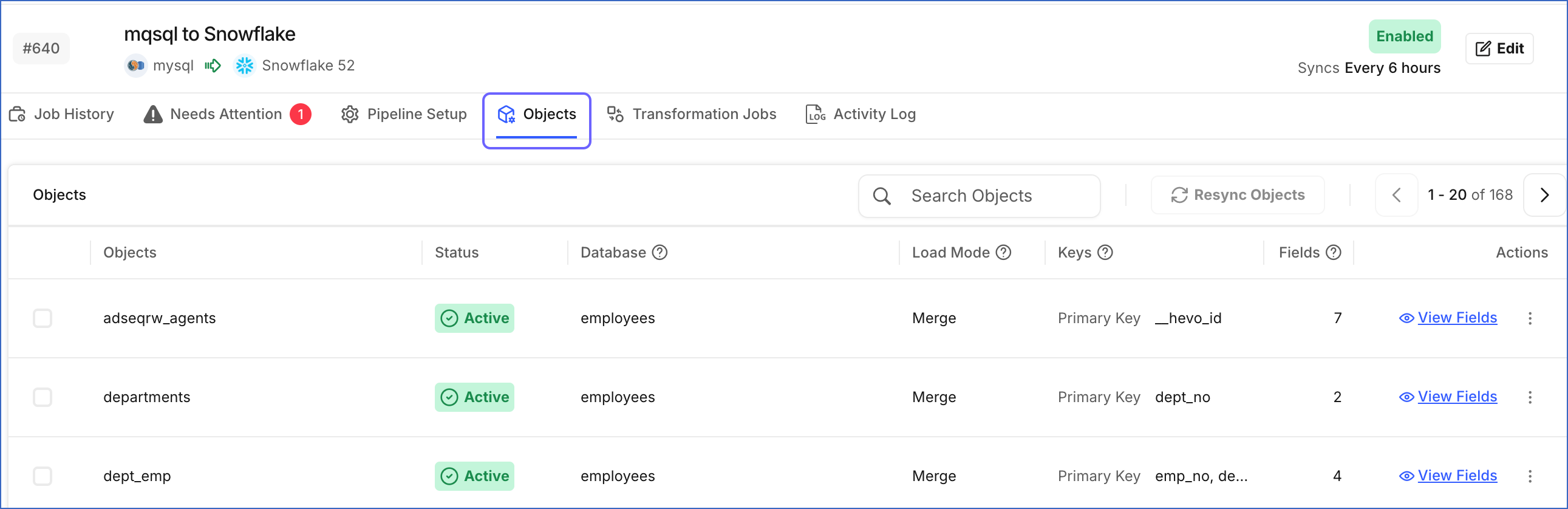
-
Objects: The entities that Hevo ingests from the Source.
-
Status: The ingestion status of the object, which can be:
-
Active: The object is included for ingestion and loading.
-
Skipped: The user has excluded the object for ingestion and loading.
-
Inaccessible: The object is excluded for ingestion and loading as it is not accessible to Hevo from the Source. For example, in PostgreSQL Sources, an object is marked as Inaccessible if the publication key specified while configuring the Source does not include the object, or if the publication is defined without any of the insert, update, or delete operations.
-
Disabled: The object is excluded for ingestion and loading due to insufficient information.
-
Blocked: The newly added object is detected in the schema but is excluded for ingestion and loading due to the user’s Schema Evolution Policy being Block all changes.
-
Deleted: The object is deleted from the Source.
-
Inconsistent: The changes in the Source object schema are incompatible with the Destination schema. The object is excluded for ingestion and loading, but the user can reset the mapping to resume ingestion.
-
Resetting: The object is being restarted and the existing Destination table will be replaced.
-
-
Database: The database in which the object is present.
-
Schema: The database schema in which the object is present.
-
Load Mode: The mode in which the object is being loaded to the Destination. This can be Append, Merge or HISTORY_TRACKING.
-
In Append mode, new records are added at the end of your Destination table without altering existing data.
-
In Merge mode, existing records are updated based on matching criteria, such as primary keys, and unmatched records are added as new entries.
-
In HISTORY_TRACKING mode, every change to a record is stored as a new version in the Destination table, along with timestamps that indicate the period during which the version was active. Existing records are preserved, allowing you to track the complete history of changes over time.
-
-
Keys: The primary and other keys defined for the object.
-
Fields: The total number of fields in the object.
Fields that Hevo is unable to access for ingestion and loading are marked as Inaccessible and are deselected for replication.
Note: The Keys and Fields columns are not displayed for Pipelines with enhanced object configuration. To view the field details for an object in these Pipelines, click View Fields next to the object.
In the Objects tab, you can do the following:
-
Use the search bar to search for the objects in the Source database by typing a complete or partial name of the object.
-
Click the Arrow (
 ) icon at the top right of the Objects section to browse through the objects available for replication. This icon is not displayed for Pipelines with enhanced object configuration, as all the objects are displayed under the Objects section on the same page.
 -
Click the Edit button on the top-right corner of the page to edit the object configurations. You can define primary keys for objects in Merge load mode if they are not already defined. You can also manually refresh the schema. Read the Managing Objects in Pipelines for the steps to do this.
-
Resync the object to reload its data to the Destination.