Activity Log (Edge)
The Activity Log provides a consolidated view of all activities related to your Pipelines. It records user actions, job statuses, and Pipeline state changes, helping you monitor Pipeline activity, identify issues early, and troubleshoot effectively. The Activity Log is available for each Pipeline, with the most recent activity displayed at the top. You can access the Activity Log from the Pipeline Detailed View for your Pipeline.
Each activity is assigned a severity level based on its nature and indicated using distinct colors as follows:
-
Info (Blue): Pipeline state changes, object addition/deletion, and schema changes.
-
Warning (Yellow): Job completions with partial failures, skipped jobs, and threshold breach.
-
High (Orange): Job failures, Pipeline deletion or disabling, and actions performed by a user, such as editing a Pipeline, triggering a run, or restarting the Pipeline.
-
Critical (Red): Deferred jobs, Pipeline disabled due to failures, and failures encountered during Pipeline deletion or disabling.
You can filter the Activity Log by one or more severity levels to focus on relevant events. You can also filter by Author, the user who performed the action.
By default, the Activity Log displays only the activities performed by you. To view activities performed by Hevo on your Pipelines, enable the Show activities by Hevo option. Once enabled, Hevo activities are displayed alongside user activities in the same view.
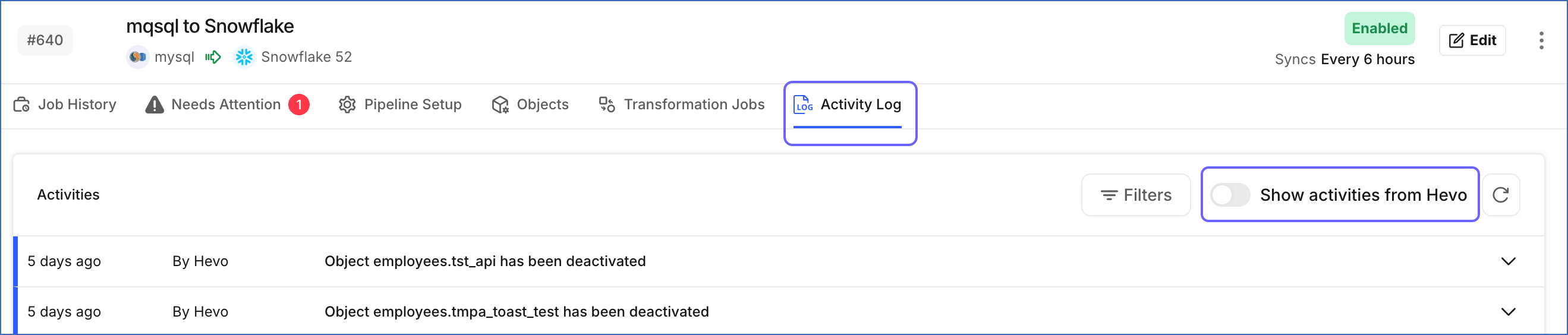
Click any activity row to expand it and view additional details, such as the integration ID, old status, new status, and the action performed.
For Pipelines configured with MySQL, Oracle, PostgreSQL, and SQL Server Sources, Hevo records two activities each time you modify the Source configuration:
-
The first activity, when you save your changes on the Edit Pipeline page.
-
The second activity, when Hevo applies those changes to your Pipeline.
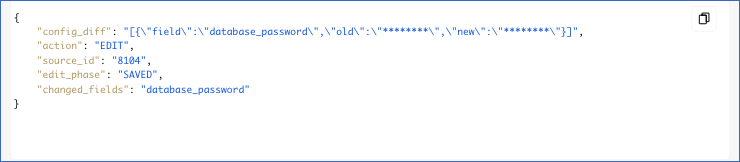
Expand an activity to view its details:
-
config_diff: The earlier and the new value of each setting you modified. Hevo masks the values of sensitive settings, such as the database password.
-
action: The action performed on your Source. This is EDIT for a change to the Source configuration.
-
source_id: The ID of the Source configured in your Pipeline.
-
edit_phase: The stage at which the activity was recorded. This is SAVED for the activity recorded when you save your changes, and APPLIED for the activity recorded when Hevo applies them to your Pipeline.
-
changed_fields: The settings you modified.
These activities give you a record of every connection change made to your Pipeline. You can confirm when a change was saved and when it took effect. As each activity records its Author, you can also identify the team member who made the change.