Understanding Activate (Edge)
Activate is currently available for Early Access. Please contact your Hevo account executive or the Support team to enable it for your team. Alternatively, request for early access to try out one or more such features.
The following sections walk you through:
-
Activate Architecture: The structure of Sources, datasets, Targets, and Activations within Hevo.
-
Sync Run Workflow: The end-to-end sequence of a single sync, from reading your Source to writing records into your Target application.
Activate Architecture
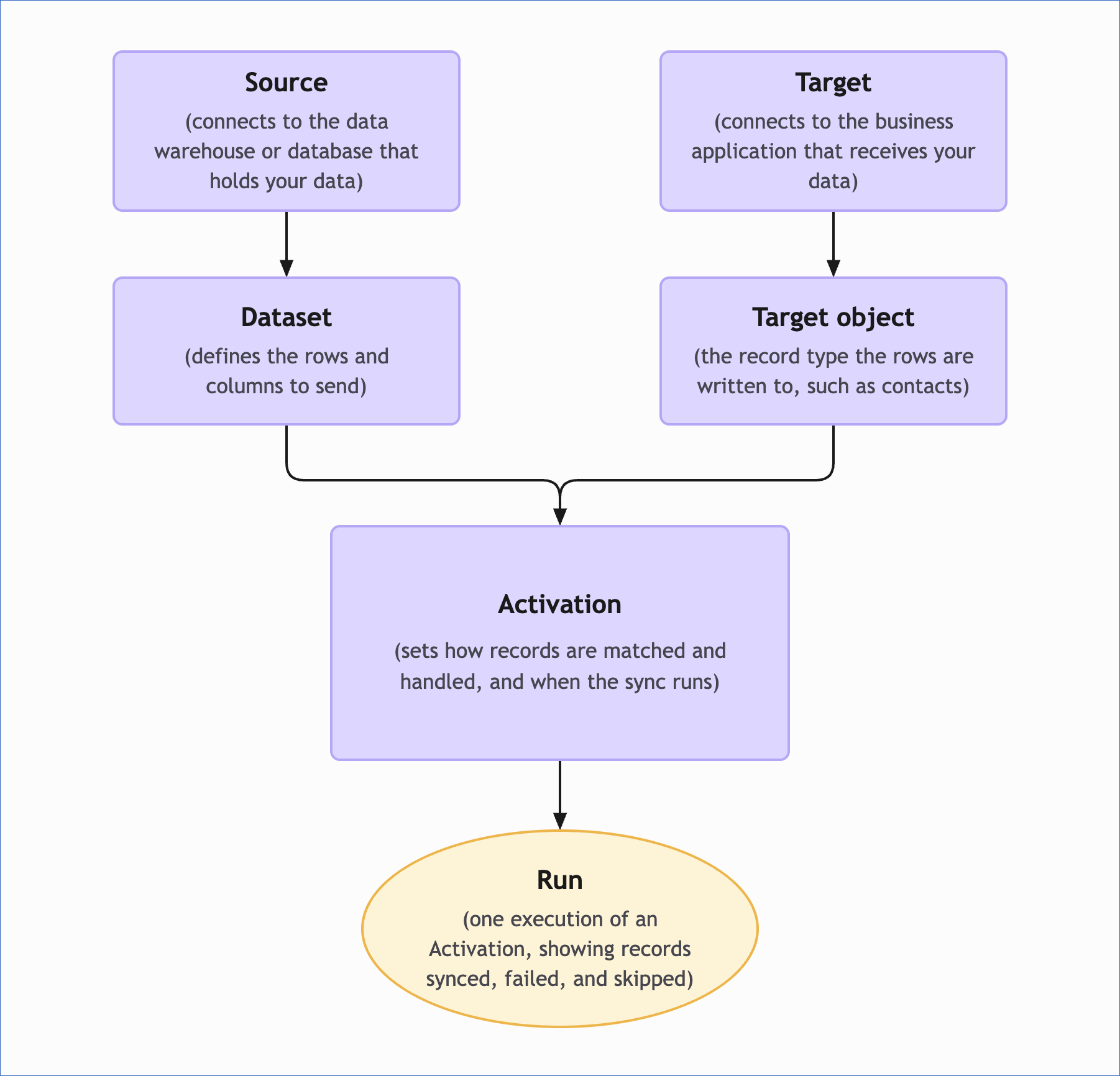
The following diagram illustrates how the components of Activate are organized and how they build on each other:
-
Source: Connects Activate to the data system that contains the data you want to send. Each dataset reads data through its Source connection, so other Activate components do not access your data system directly. A Source can support multiple datasets.
-
Dataset: Defines the rows and columns that Activate sends. A dataset belongs to a single Source and can be defined using an SQL query or a selected table. The columns it returns are the columns available for mapping in an Activation. A dataset can be used by multiple Activations.
-
Target: Connects Activate to the business application that receives your data. Depending on the application, you either sign in and grant Hevo access or provide connection details such as an API token. A Target can be used by multiple Activations.
-
Target Object: Defines the type of record that receives the data in the Target application, such as contacts or companies in HubSpot. You select a Target object for each Activation, so one Target can support multiple Target objects and Activations.
-
Activation: Connects a dataset to a Target object and defines how and when the data is synchronized. It specifies the sync behavior, sync key, field mapping, and sync schedule. Read Sync Run Workflow to understand what happens each time an Activation executes.
-
Run: Represents one execution of an Activation. Each run records the outcome of that execution, including how many records were synced, failed, or skipped, along with the reasons for failures.
Sync Run Workflow
Each time an Activation runs, whether on its schedule or when you trigger it manually, Activate creates a run that reads the current data from your dataset and syncs it to the Target application. The following diagram illustrates the end-to-end workflow:

A run follows the same sequence every time:
-
Execute the dataset: Activate executes the dataset against the Source to retrieve the current set of rows. If the dataset uses an SQL query, Activate runs the query and uses the returned rows for the run. If the dataset is based on a selected table, Activate reads the current data from that table.
-
Detect changes: For subsequent runs, Activate compares the current dataset result with the last successful run and sends only the rows that changed. This is called an incremental run, and it applies to both scheduled and manually triggered runs. A resync skips this comparison and sends every row that the dataset returns.
-
Match records: Activate uses the sync key to determine whether each dataset row corresponds to an existing record in the Target object. The sync key uses a dataset column and a field in the Target object that contain the same unique value. For Insert Only, Activate does not check whether a record already exists, and every row is sent as a new record.
-
Apply the sync behavior: Activate applies the sync behavior based on whether a matching record exists in the Target object. Depending on the behavior you select, Activate can:
-
Create a new record.
-
Update an existing record.
-
Create or update a record.
-
Delete a matching record.
-
Keep the Target object in sync with the dataset.
The available behaviors depend on the Target object.
-
-
Apply the field mapping: Activate uses the field mapping to determine which dataset columns are written to which fields in the Target object. Only the mapped columns are sent to the Target application, and Activate uses the application’s API to write each mapped value to the corresponding field. If a mapped dataset column has no value, Activate sends an empty value, which clears the corresponding field in the Target application instead of leaving its existing value unchanged.
-
Record the run outcome: Activate records the outcome for every row processed during the run. Each row is counted as synced, failed, or skipped, and failures include the reason for the failure. The exact outcome depends on the sync behavior and the data in the row. For example, a row without a sync key value is counted as skipped for the sync behaviors that require record matching, and rows that contain duplicate sync key values can be counted as failed when the selected behavior creates or updates records. Activate identifies these rows before anything is sent to the Target application, so a run can report failures even when no record reached the Target application.
A run can therefore finish with a combination of synced, failed, and skipped records. Read Run Statuses to understand what each combination of status and record counts means, and use the reported errors to troubleshoot failed records.